Synthesis arrangement: kits and machines
Each of the six synth tracks plays one machine. A machine is a kind of sound generator. Its output goes through the same chain on every track: the amp, the filter, the effects and the delay. A kit stores the machines of all six tracks and everything that belongs to them.
ARRANGEMENT #
MM manual p.1-17
The machines come in families:
| Family | What it is |
|---|---|
| SWAVE | SuperWave: analogue style oscillators with unison and sub oscillators |
| SID | the 6581 chip, with ring modulation and sync |
| DPRO | DigiPRO: digital waves, a beat box of drum sounds, and on the MKII a double draw and an ensemble |
| FM+ | frequency modulation, in three arrangements |
| VO | a voice with vowels and consonants |
| GND | basic sources: silence, a sine and noise |
| FX | machines that process audio from the inputs or other tracks |
Every track also has the same track effects after its machine: an amp with an envelope and distortion, a filter with its own envelope, an equaliser, sample rate reduction and a tempo synchronised delay. Chapter 7 describes them.
KITS #
MM manual p.1-18
A kit holds the machine of each track and all seven DATA pages of each track, with the LFOs. It also holds the MIDI pages of the six MIDI tracks, the routing and input of each track, the trig settings, the multi envelope and the name.
The editor edits the kit the machine plays. It does not write a value to a stored kit slot until you save.
The ‹ and › keys beside the kit name in the LCD load the kit before or after. When the kit has unsaved edits the machine asks first.
LINK KITS AND PATTERNS #
MM manual p.1-18
Every pattern recalls a kit. When you pick a pattern, the machine loads its kit, unless the kit is already the one that plays.
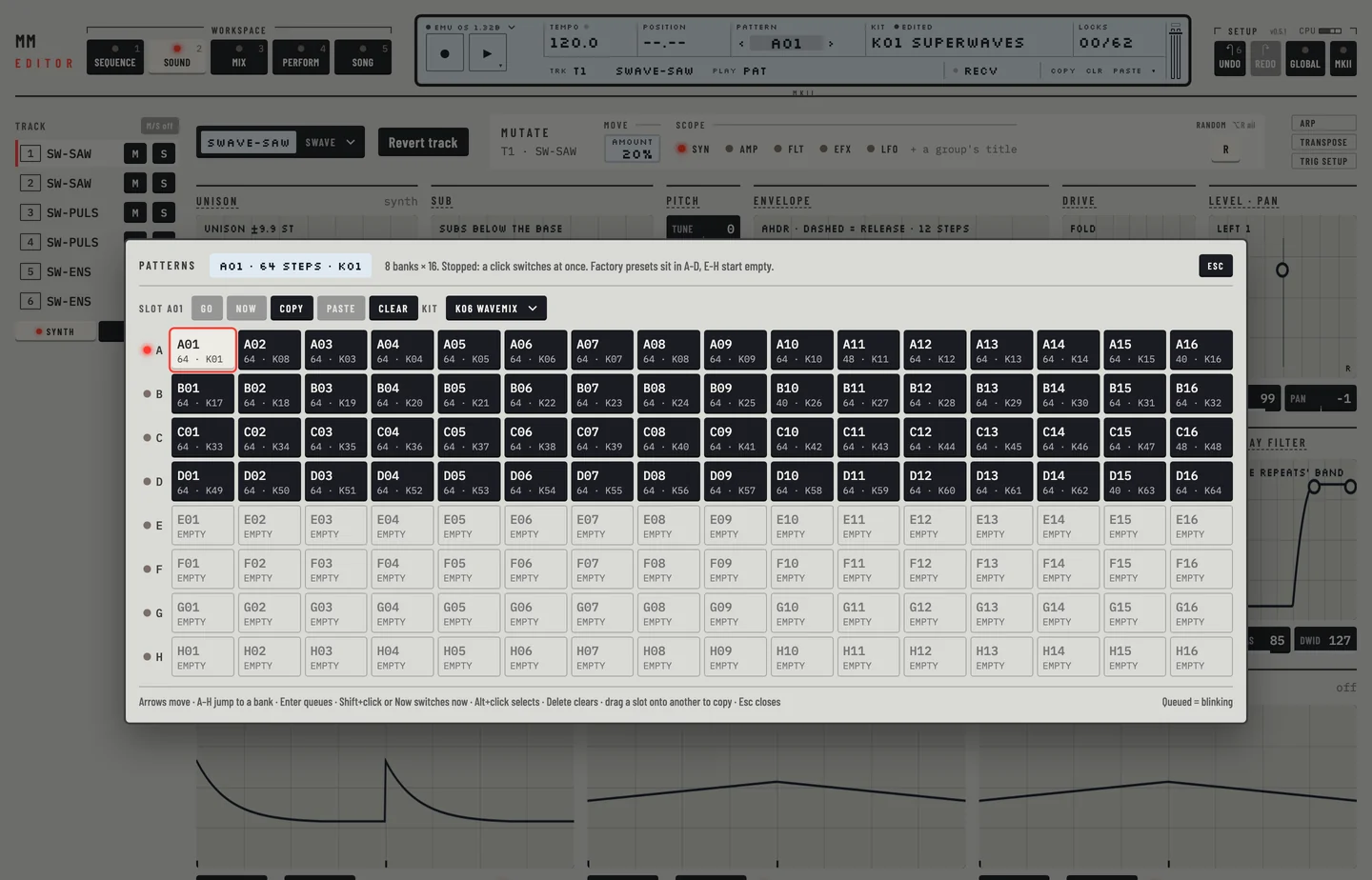
The pattern chooser shows, on each pattern, its length and its kit as K and a number. The kit library shows on each kit slot the patterns that link to it. A kit no pattern links to ends its name with a star and reads "no pattern".
To see that a kit is not loaded twice:
- Pick a pattern. Its kit loads.
- Change a value on the Kit workspace. The kit reads edited.
- Pick a second pattern that recalls the same kit. The pattern changes, the kit stays as you edited it and the editor asks nothing.
If you pick a pattern with a different kit while the current kit has edits that are not saved, the editor asks. It offers Save kit, then switch, a switch that leaves the edits to the machine's UNDO KIT, and Cancel.
Loading a kit from the library makes it the kit of the current pattern. To set the kit of any pattern:
- Click the <PATTERN> field in the LCD. The pattern chooser opens.
- Hold [⌥] and click the pattern. It is selected, not loaded.
- Choose a kit in the Kit list. The pattern now recalls that kit.
If the pattern plays, the machine loads the new kit at once. When the kit that plays has unsaved edits, the editor asks first: answer Cancel with [ESC] and the pattern keeps its kit and the edits stay. Press [⌘] + [Z] to take the change back.
LOADING A KIT #
MM manual p.1-19
The machine holds 128 kits. The kit library lists them all.
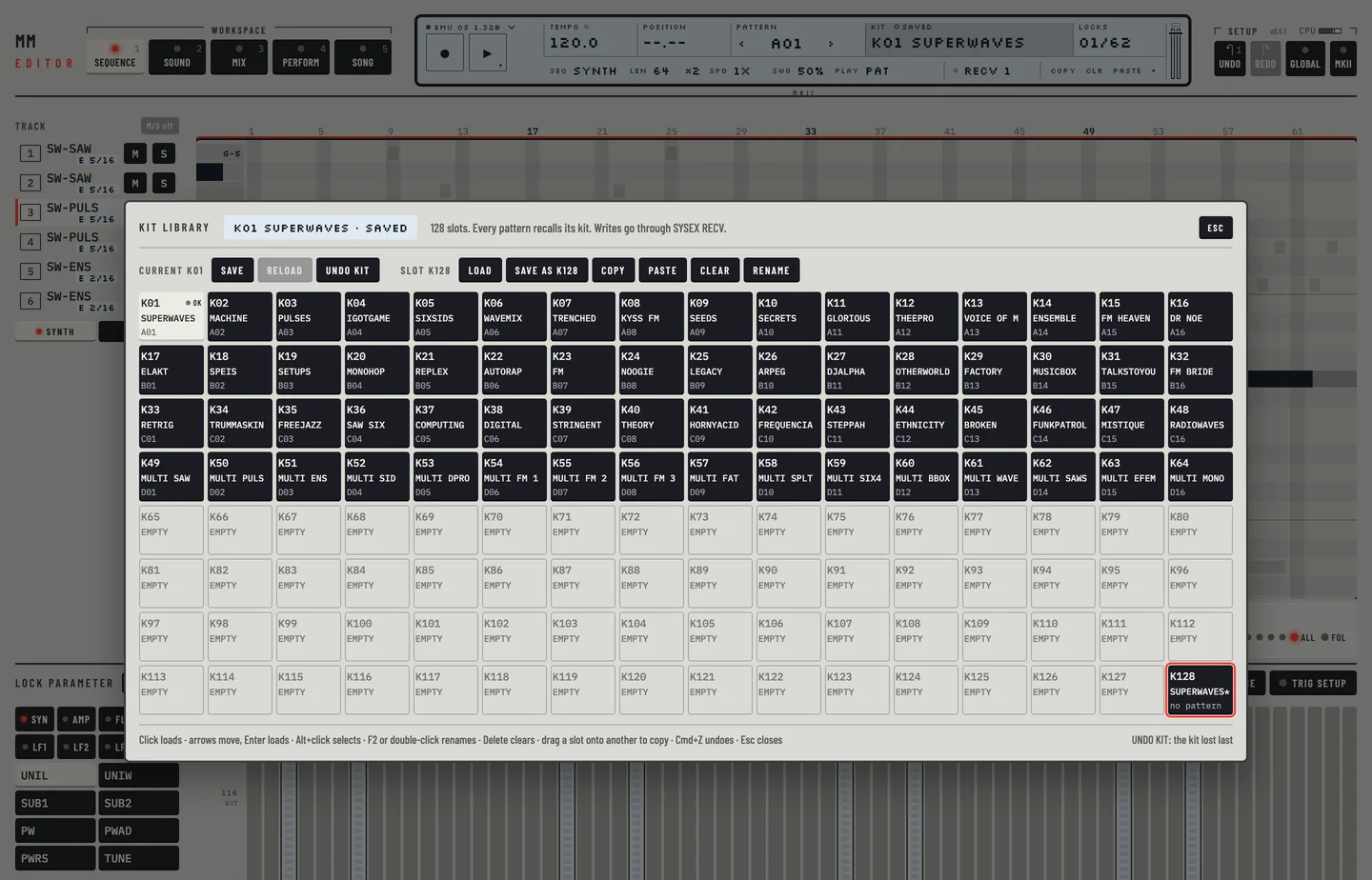
- Click the <KIT> field in the LCD. The kit library opens with the 128 slots as a grid.
- Click a slot, or move to it with the arrow keys and press [ENTER]. The kit loads. If the current kit has unsaved edits, the editor asks first.
- To select a slot without loading it, hold [⌥] and click.
The current kit is marked in the grid, with ok or ed to say whether it is saved or edited. Slots with a name show it; empty slots read EMPTY. [ESC] closes the library.
Load an empty kit
Load an empty slot to start from nothing. The kit has six tracks with the machine GND-SIN, the sine, and default settings.
SAVING AND NAMING #
MM manual pp.1-19, 1-20
The small field beside the <KIT> label reads edited while the kit differs from its saved slot on the machine, and saved when it matches. The kit edits are kept in the project of your DAW as well.
To save a kit under another slot:
- Click <KIT> on the LCD. The kit library opens.
- Hold [⌥] and click a slot. It is selected.
- Click Save as and answer the question.
- Save writes the current kit to its own slot. The slot's old content goes to the machine's UNDO KIT.
- Save as writes it to the slot you selected, after asking if that slot is used, and the kit becomes that slot's kit. The slot you saved from keeps what it had.
To rename a kit, select its slot and press [F2], or double-click the slot, or click Rename. Type a name of up to 11 characters and press [ENTER]. The editor takes the name as text, so there is no character picker. Press [⌘] + [Z] to take a rename back.
UNDO KIT #
MM manual p.1-20
The machine keeps one extra kit, the UNDO KIT, as the first entry of its kit list. It holds the kit lost to the last load or overwrite without saving. The dialogs of the editor name it when an action puts a kit there. The editor's own undo, [⌘] + [Z], works on top of it.
To lose a kit on purpose and bring it back, rename the kit that plays, which is an edit you do not save, then load another kit. The machine keeps the edited kit as its UNDO KIT. To load it:
- Open the kit library: click the KIT field on the LCD.
- Click UNDO KIT. The lost kit plays again, with its unsaved edits, and the slot it came from becomes the current kit.
- Click Save to keep it.
If the current kit has unsaved edits, the editor asks first: the machine does not keep them when it loads the UNDO KIT.
COPY KIT #
MM manual p.1-21
- Open the kit library. Hold [⌥] and click the kit slot to select it.
- Click Copy, or press [⌘] + [C / V].
- Hold [⌥] and click the slot to copy into, then click Paste.
- Press [⌘] + [Z] with the library open. The slot is back as it was.
You can also drag a slot onto another slot to copy it there.
Pasting a kit writes it to the machine as a dump. The machine takes a dump only in its receive state, so the editor passes the dump through the machine's SYSEX RECV, and the sync field of the LCD reads RECV while it does. With a real Monomachine the field reads SEND and a number until you send the edit.
CLEAR KIT #
MM manual p.1-21
- Hold [⌥] and click the kit slot in the library to select it.
- Click Clear, or press [DELETE], and answer the question. The slot is cleared.
The slot gets the empty kit: six sine machines and default settings. The machine has no clear message, so the editor writes the empty kit as a dump, through SYSEX RECV. [⌘] + [Z] undoes a paste, clear or rename.
ASSIGNING A MACHINE #
MM manual p.1-22
- Select the track in the rail.
- Go to the Kit workspace ([2]).
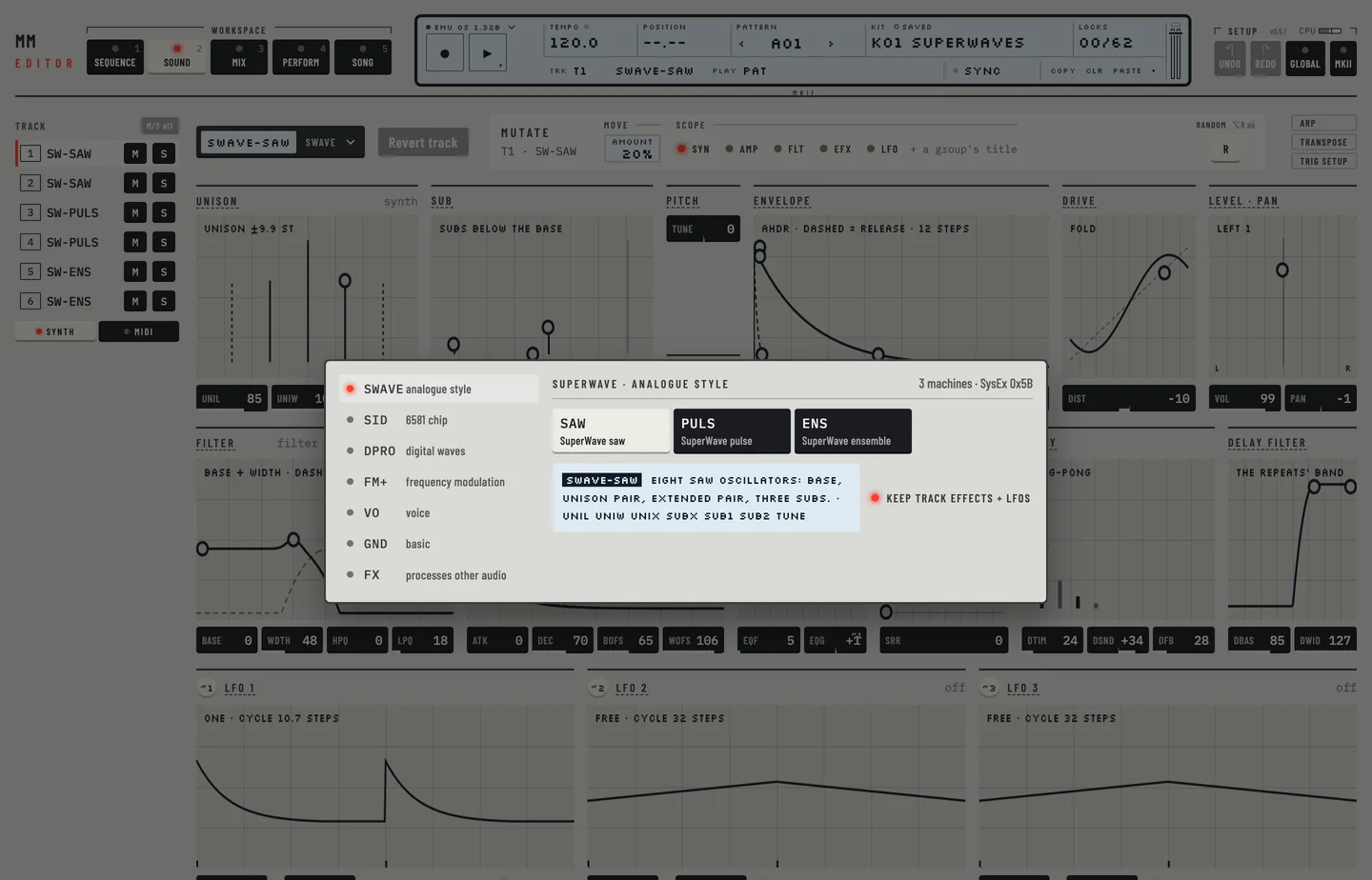
- Click the machine name at the head of the workspace. The machine picker opens.
- Click a family at the left, then a machine. Move the pointer over a machine to read what it is and what its eight synthesis parameters are called.
The track now plays the machine, with the machine's start values for the synthesis page.
The picker has a toggle, Keep track effects + LFOs. While it is lit, the amp, filter, effects and LFO pages of the track stay as they were. Switch it off to set those pages to their start values too.
COPY MACHINE #
MM manual p.1-23
- Go to the Kit workspace and select the track.
- Click <COPY> under the LCD, or press [⌘] + [C]. The machine and all seven DATA pages are copied.
- Select another track and click <PASTE>, or press [⌘] + [V]. The track gets the machine and its settings.
- Press [⌘] + [Z] to take the paste back.
CLEAR MACHINE #
MM manual p.1-24
On the Kit workspace, click <CLR>. The track plays GND-SIN again, with every page at its start values.
SETTING THE MIX BUS #
MM manual p.1-24
A track sends its sound to one or two mix buses: AB, CD and EF. In the Mix workspace each track strip has three Out keys. Click a key to send the track to that bus or to stop sending it. A track can feed two buses. Chapter 18 describes routing.
PARAMETER EDITING #
MM manual p.1-25
A track has seven pages of eight parameters, 56 in all. The Kit workspace shows them as groups of a few values, with a small picture where the values draw a shape:
- the synthesis page, whose groups depend on the machine;
- the amp, filter and effects pages, the same on every machine;
- the three LFOs at the foot.
Most synth machines have TUNE, a fine tune in semitones, on the synthesis page. The beat box and the FX machines do not.
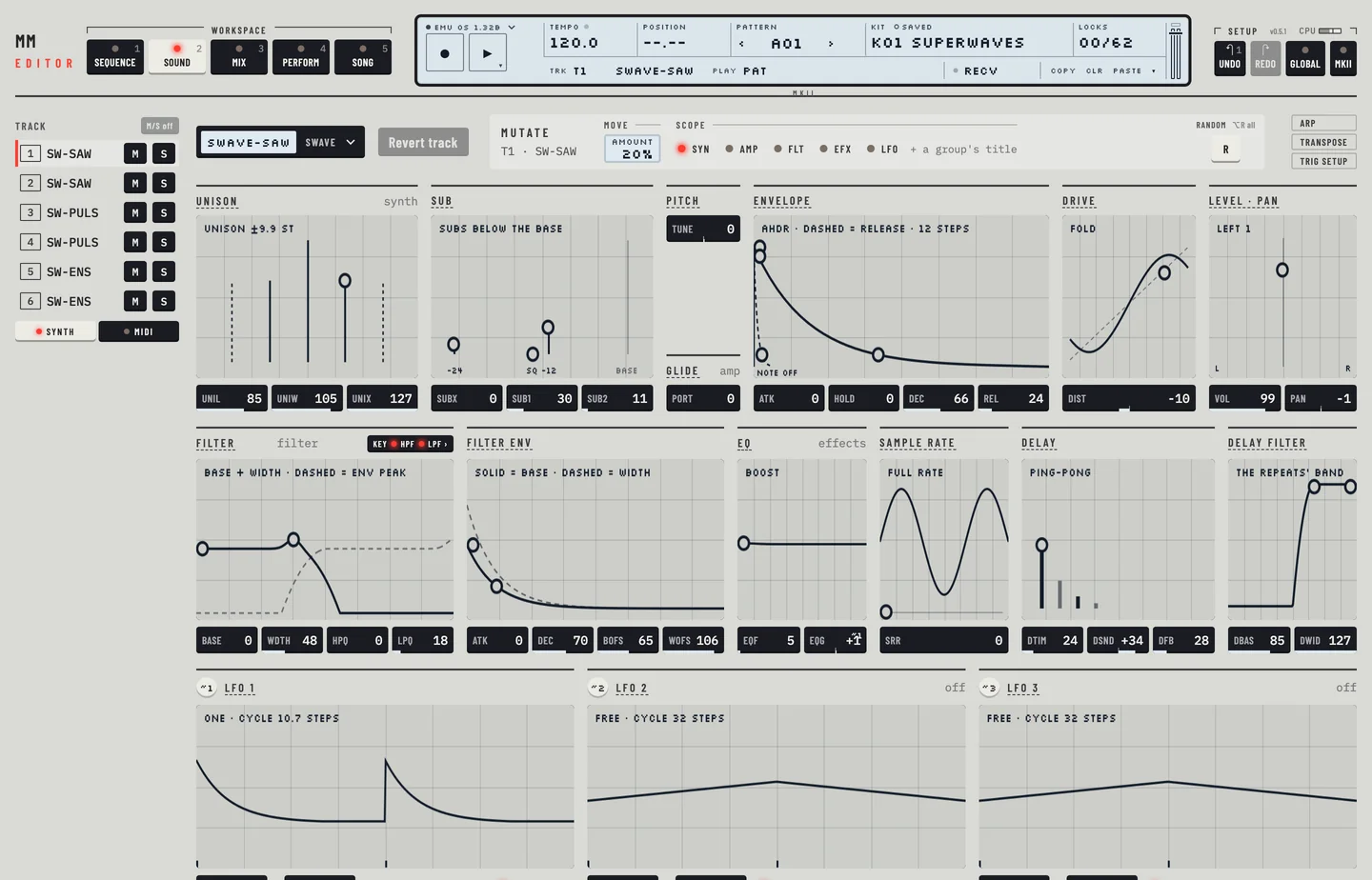
Every edit goes to the machine at once, as a controller message, but it is not in the stored kit until you save. The edited mark in the LCD says so.