Additional kit settings
Besides the sound of each track, a kit holds settings for how the tracks are played: what the joystick, the velocity and the key position control, which track a trig also plays, how the portamento and legato behave, and how a single keyboard drives several tracks. The assign settings and the multi trig, multi map and multi envelope settings are on the Perform workspace. Press [4], or click the Perform tab. The trig track settings are on Pattern.
ASSIGN #
MM manual pp.1-38, 1-39, 1-40
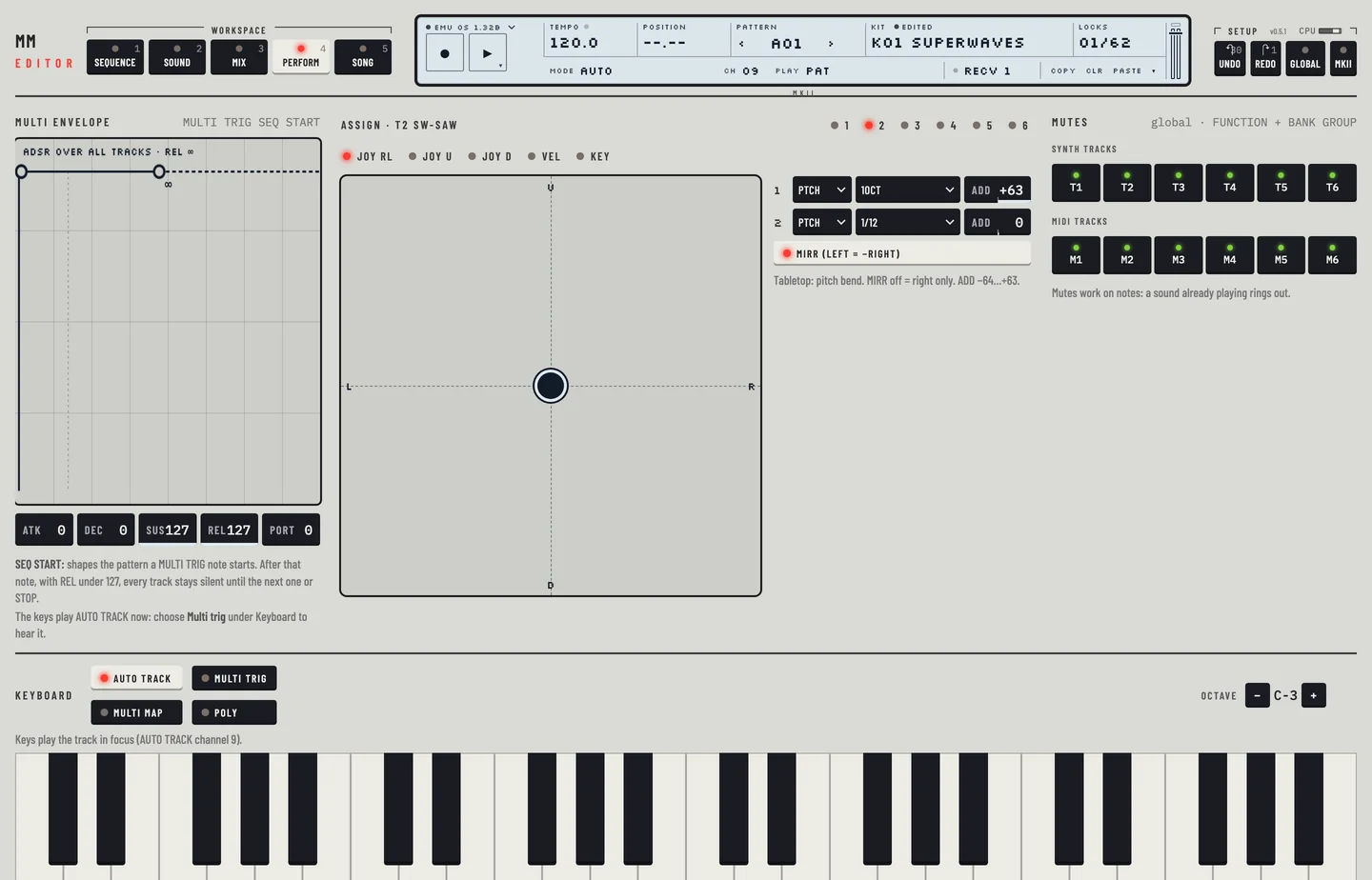
Assign lets a performance control move a parameter of the track. Each control has two rows. A row names a page, a parameter on that page, and an amount to add.
The Assign card follows the track selected in the rail. Its header shows the track and its machine, for example Assign · T2 SWAVE-1. The keys 1 to 6 in the header choose another track.
- Press [4].
- Click a tab to choose the control: JOY RL, JOY U, JOY D, VEL or KEY.
- In a row, choose the page: SYN, AMP, FLT, EFX, LF1, LF2, LF3 or PTCH.
- Choose the destination. The list holds the parameters of that page for the machine on the track.
- Set ADD, from −64 to +63, by dragging the box up or down. Double-click it to return to 0.
- Press [⌘] + [Z] to take back the change.
Copy, clear and paste an assign
The LCD keys Copy, Clr and Paste act on all the assign tabs of the track while Perform is open.
- Click Copy, or press [⌘] + [C].
- Choose another track in the Assign header.
- Click Paste, or press [⌘] + [V]. The track takes all the tabs of the copy.
Clr empties the tabs of the track. [⌘] + [Z] takes back a paste or a clear.
JOYSTICK
The tabs JOY RL, JOY U and JOY D hold the joystick's three directions: right and left together, up and down. Beside the rows the card shows a stick. Drag it with the pointer to try the assignment. It springs back to the middle when you let go, unless HOLD or RANDOM under the stick is lit. HOLD keeps the stick where it is until you click it again. RANDOM moves the stick by itself inside the rectangle set with REGION, at the Speed you choose. STOP and Panic end it. The stick sends the same MIDI as your hand, so the machine receives it at the same rate. On the tabletop models JOY RL is pitch bend, JOY U the mod wheel (CC 1) and JOY D the breath controller (CC 2).
MIRR is on the JOY RL tab. When it is lit, a move to the left acts as the same move to the right with the sign reversed. When it is dark, only the right half of the movement acts.
VELOCITY
The VEL tab assigns the velocity of the notes you play to a parameter. The sequencer always plays its notes at velocity 100, so a velocity assign only responds to the keys.
KEY TRACKING
The KEY tab assigns the key you played last to a parameter. The value is low for the lowest key and near its maximum for the highest.
Two keys on this tab, HPF tracks keys and LPF tracks keys, switch the key tracking of the high-pass and low-pass filters. KEY in the title of the Filter group on Kit shows the two switches and opens this tab. Chapter 7 describes filter tracking.
TRIG TRACK SETTINGS #
MM manual pp.1-40, 1-41
These settings belong to one track. They sit in the Trig setup tab, in the header of the lock lane on Pattern. A MIDI track has the MIDI page tab in its place (see chapter 16).
- Press [1].
- Select a synth track in the rail.
- Click Trig setup above the lock lane. The keys of the tab appear in the rail.
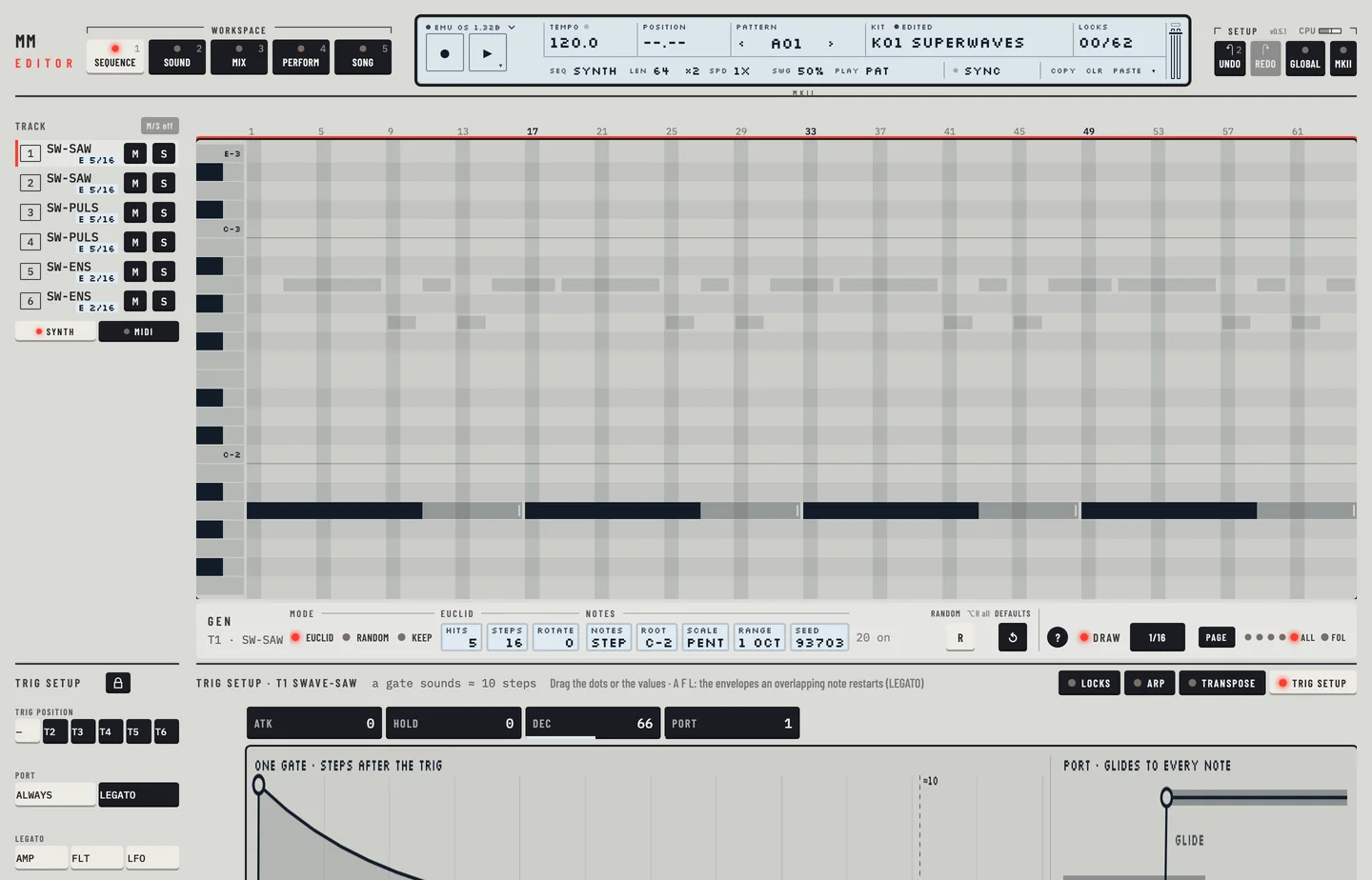
Trig position chooses a second track that also plays this track's notes. The keys are T1 to T6, without the track itself, and a dash for none. The Mix workspace draws the link as a dotted cord labelled TRIG and the target track. On Pattern and Kit, the number of a track that plays only because another track forwards its trig lights in blue; a track with its own trig lights in the usual colour.
Port sets how the portamento works.
- ALWAYS: the track glides to every note.
- LEGATO: the track glides only between notes that overlap.
To change it, click the other Port key. [⌘] + [Z] takes the change back.
Legato has three keys, AMP, FLT and LFO. A lit key means that envelope fires again when a note starts while the one before still sounds. With all three lit every note retriggers, which suits a bass. With all three dark the notes join smoothly, which suits a lead.
The value boxes ATK, HOLD, DEC and PORT above the picture are the track's amp envelope and glide amount. The picture draws one gate and the glide between two notes. Drag its dots to change the values.
MULTI TRIG #
MM manual pp.1-41, 1-42, 1-43
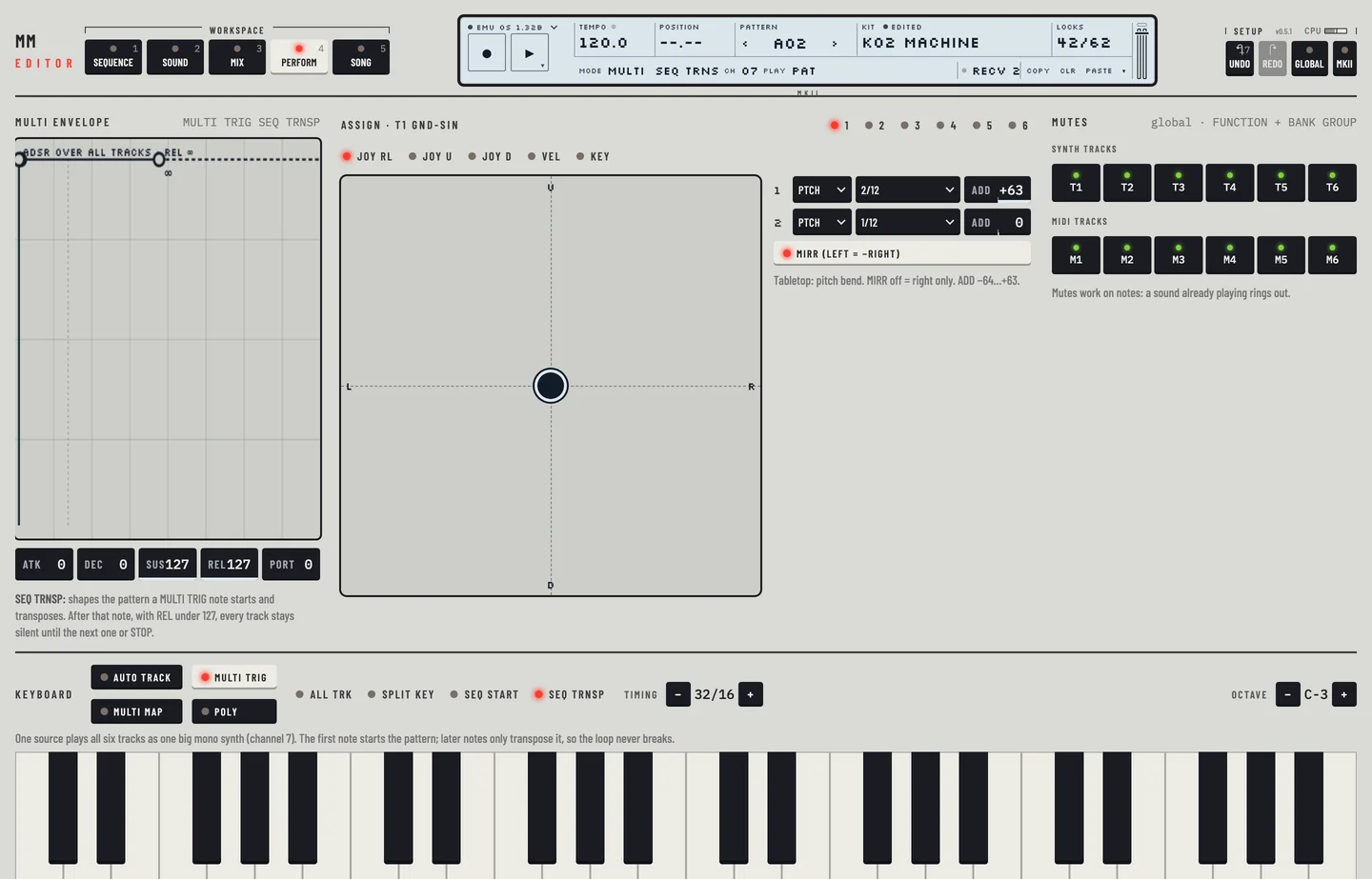
In multi trig mode one source plays all six tracks, as a single large mono synth.
- Press [4].
- In the Keyboard bar, click Multi trig.
- Click one of the four modes: ALL TRK, SPLIT KEY, SEQ START or SEQ TRNSP.
- Play the keyboard on the page, or send notes on the multi trig channel. The second line of the LCD shows the channel in the CH field. You set the channel in GLOBAL (chapter 19).
ALL TRK
Every note plays on all six tracks. Each track keeps its own arpeggiator.
SPLIT KEY
The keyboard splits in two. Keys from the split point up play the tracks from Tn to T6. Keys below play T1 to the track before Tn.
- Click SPLIT KEY.
- Click − or + beside Upper from to choose Tn.
- Drag the split marker on the keyboard to choose the split key. The marker reads, for example, SPLIT C-4 · T3-6 above.
In split mode the multi envelope does not act.
SEQ START
Each note you play restarts the pattern. The pattern is transposed by the distance of the note from C-4.
SEQ TRNSP
The first note you play starts the pattern. Later notes only transpose it, so the loop never breaks.
Timing
SEQ START and SEQ TRNSP show a Timing stepper. Click − or + to choose DIRECT, 1/16, 2/16, 4/16, 8/16, 16/16 or 32/16. With DIRECT the note acts at once. With another value it acts at the next division of that length, and the page says so when you play.
MULTI ENV #
MM manual pp.1-43, 1-44
The Multi envelope card holds an ADSR that acts on top of every track's own envelope. Notes on the multi trig channel set it going. What it shapes depends on the multi trig mode of the kit. The title of the card names the mode, and the line under the boxes says what the envelope does in it.
- ALL TRK: it shapes the notes of the multi trig channel, which play all six tracks.
- SPLIT KEY: it has no effect.
- SEQ START and SEQ TRNSP: it shapes the pattern that a multi trig note starts.
Before the first multi trig note the envelope leaves the tracks alone. After one, its level holds every track. With REL under 127 every track is silent once that note is let go, its own notes too, until the next multi trig note or STOP. In SEQ START and SEQ TRNSP the pattern goes silent with them. Panic ([⌘] + [.], or Panic in the transport menu) sends STOP and opens it again.
To hear the envelope from the editor, click Multi trig in the Keyboard card: the keys then play on the multi trig channel. While the keys play another mode, the card says so.
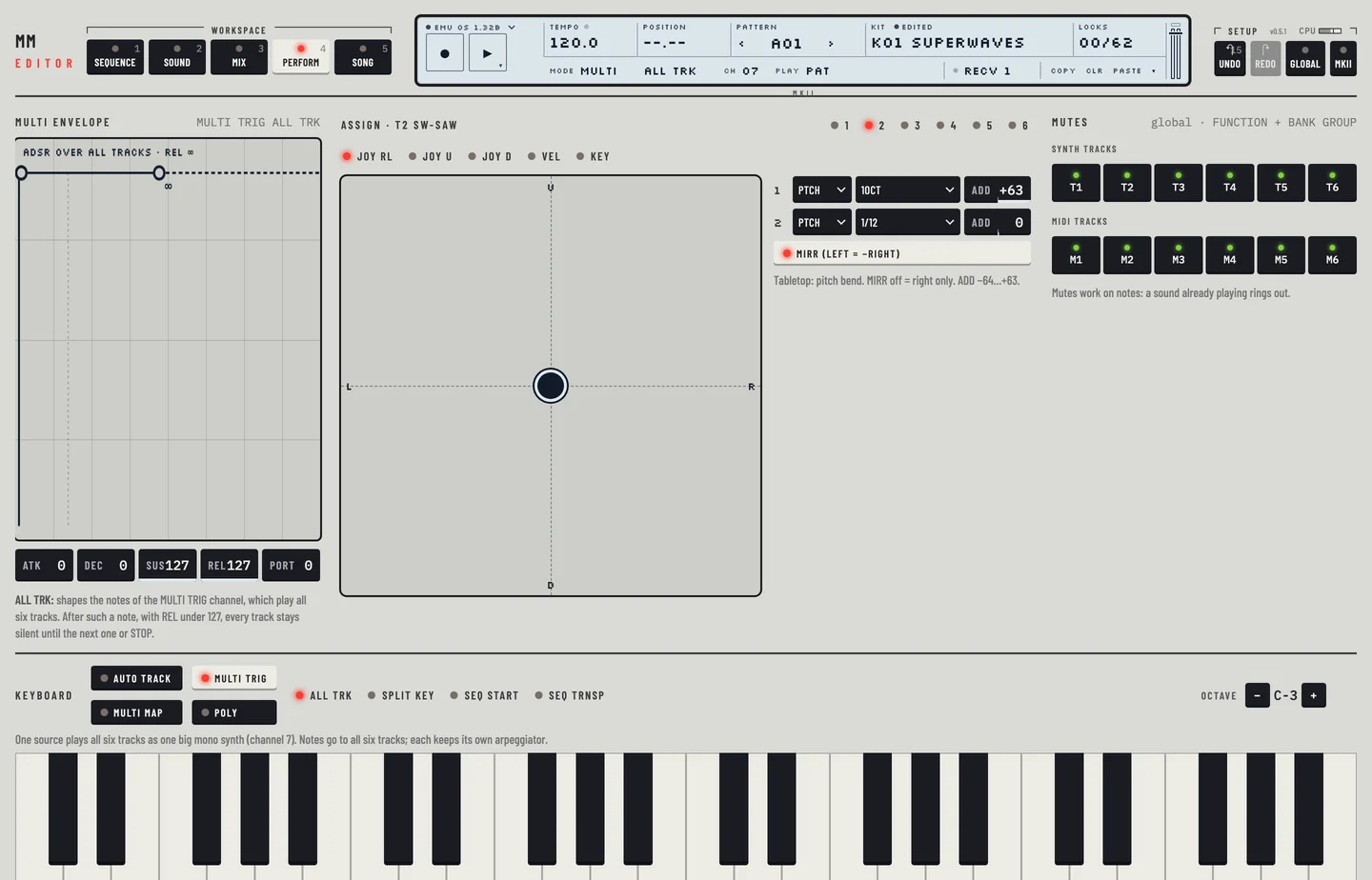
The five boxes are ATK, DEC, SUS, REL and PORT. PORT is the portamento for all tracks. The plot above them shows the envelope: it rises for ATK, falls to the SUS level for DEC, holds, then falls to nothing for REL. Each dot sits on the curve. Drag them to change ATK, DEC with SUS, and REL. A REL of 127 never fades: the level runs on to the edge of the plot, marked ∞. Drag the REL dot to the end of its stage for 127.