The pattern sequencer: pattern operation
The sequencer plays patterns. The Monomachine holds 128 patterns, A01 to H16, in eight banks of 16. A pattern has twelve tracks: six synth tracks and six MIDI tracks. It is up to 64 steps long. The editor shows the patterns on the Pattern workspace. Press [1], or click the Pattern tab.
BASIC PATTERN OPERATION #
MM manual pp.1-45, 1-46, 1-47
PATTERN SELECTION
The pattern field of the LCD shows the pattern that plays. Click ‹ or › beside it to go to the pattern before or after. For any other pattern, open the pattern chooser.
- Click the pattern field, or focus it and press [ENTER]. The chooser opens.
- Click a bank letter, A to H, or press the letter. The row of 16 slots shows that bank.
- Click a slot. Each slot shows the pattern name, its length and its kit, for example 32 · K01. A slot with no data reads EMPTY.
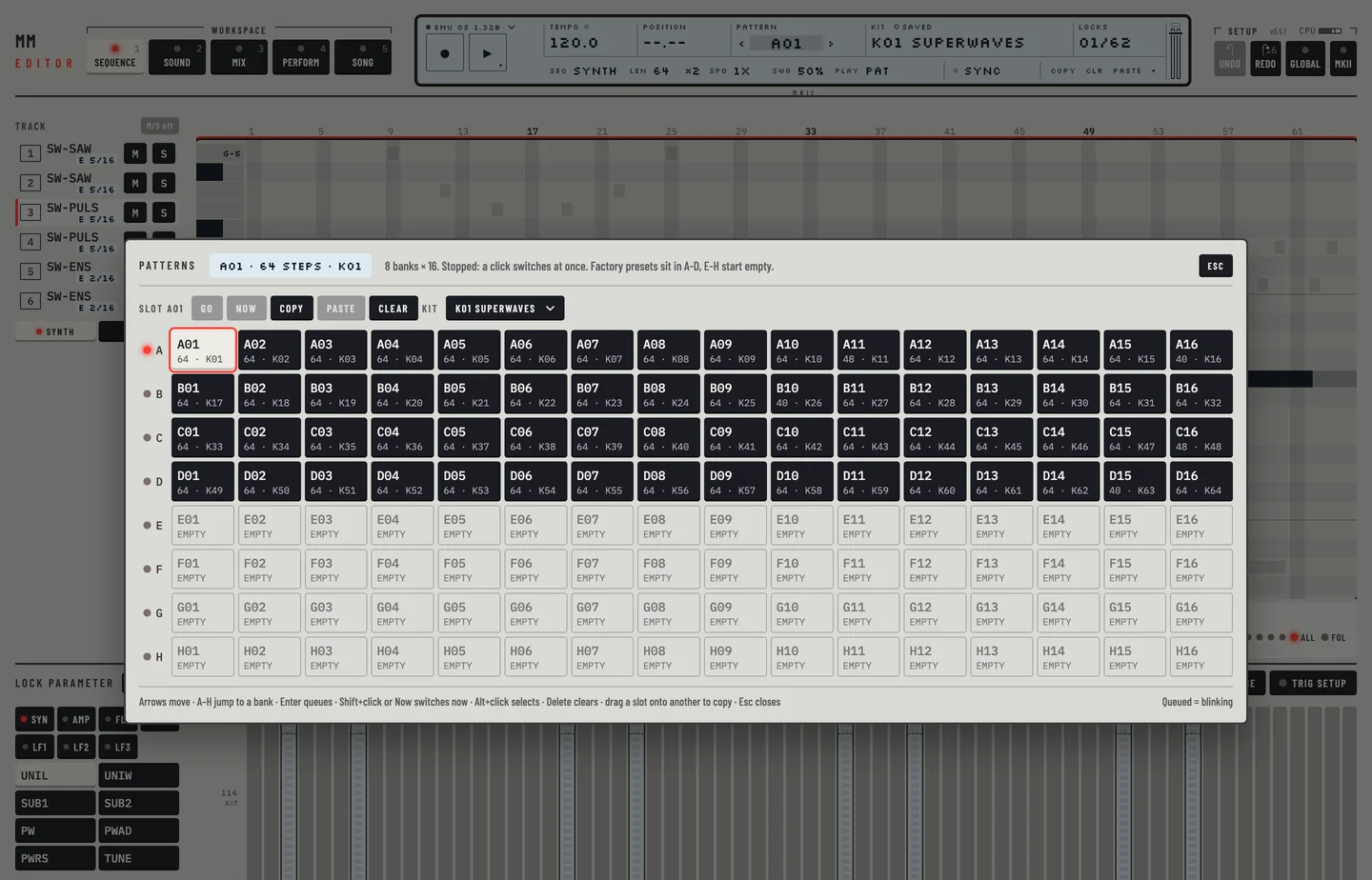
While the machine is stopped, a click switches to the pattern at once. While it plays, the machine switches at the end of the pattern that plays. The slot is marked as queued, and the pattern field of the LCD blinks with the name of the pattern that waits. The button in the row above the slots reads Go when the machine is stopped and Queue when it plays.
To switch at once while the machine plays, hold [⇧] and click the slot, or click Now.
Press [ESC] to close the chooser.
PATTERN CHAINING
A chain plays patterns of one bank one after the other, each once, and then starts again. You build a chain on the Song workspace, on the same pattern palette that builds a song.
- Press [5].
- Click CHAIN over the pattern palette.
- Click a bank, A to H.
- Click the pads in the order to play. Each pad shows its number in the chain, up to 16.
The machine plays the chain as soon as there are two pads. If it plays, the chain starts at the end of the pattern that plays. If it is stopped, [SPACE] starts it at the first pad. The line over the bank letters reads CHAIN and the patterns in order, for example CHAIN A03»A05.
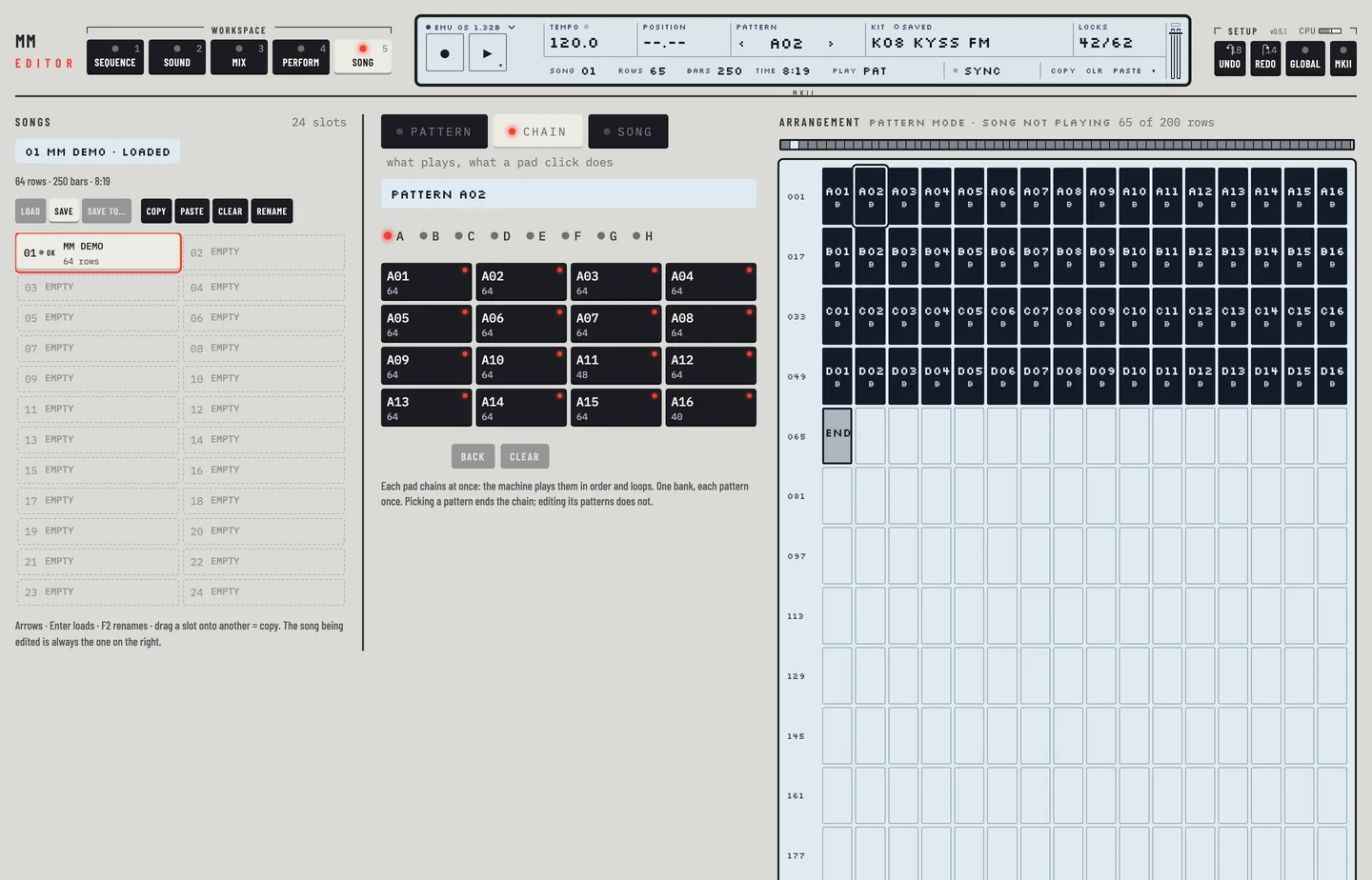
- Click a numbered pad to take it out of the chain.
- Back takes out the last pad.
- Clear ends the chain.
Choosing a pattern from the pattern field or the chooser also ends the chain. Editing the patterns of a chain does not.
The pads follow the machine. If the chain ends on the machine, for example because you chose a pattern on the LCD, the pads start over and the key over the palette goes back to PATTERN. If the machine plays a chain that the pads do not show, the pads show it. The editor sends a chain a moment after your last click on a pad. If you click PATTERN or SONG inside that moment, the chain is not sent.
SCALE SETUP
The scale of a pattern is its length and its speed. Both are on the second line of the LCD while Pattern is open.
#### Length
LEN sets the length of the pattern, from 2 to 64 steps. All tracks share it.
- Click LEN for the next full page: 16, 32, 48, 64 and then 16 again.
- Hold [⇧] and click for the page before.
- Scroll the wheel over it to change the length one step at a time.
LEN changes the length and copies nothing. Steps past the old length hold what the pattern stored there. To fill a longer pattern, use ×2.
The key beside it, ×2, doubles the pattern. The new half is a copy of the first half, with every track's steps, slides, swing steps and locks. A pattern of more than 32 steps cannot double, and the page says so. [⌘] + [Z] takes the doubling back in one step.
A page is 16 steps. The Page key on the bar above the lock lane steps through the pages. The keys [ and ] go to the page before and after. The four lights beside Page show how many pages the pattern has and which one you see. All shows every step at once. Fol makes the page follow the play position.
#### Speed
SPD sets the tempo multiplier of the pattern: 1X, 2X, 3/4X or 3/2X. Click it for the next value, or hold [⇧] and click for the one before.
#### Song rows
A song row can play a part of a pattern with an offset and a length of its own. See "Play part of a pattern" in chapter 17.