Low frequency oscillators
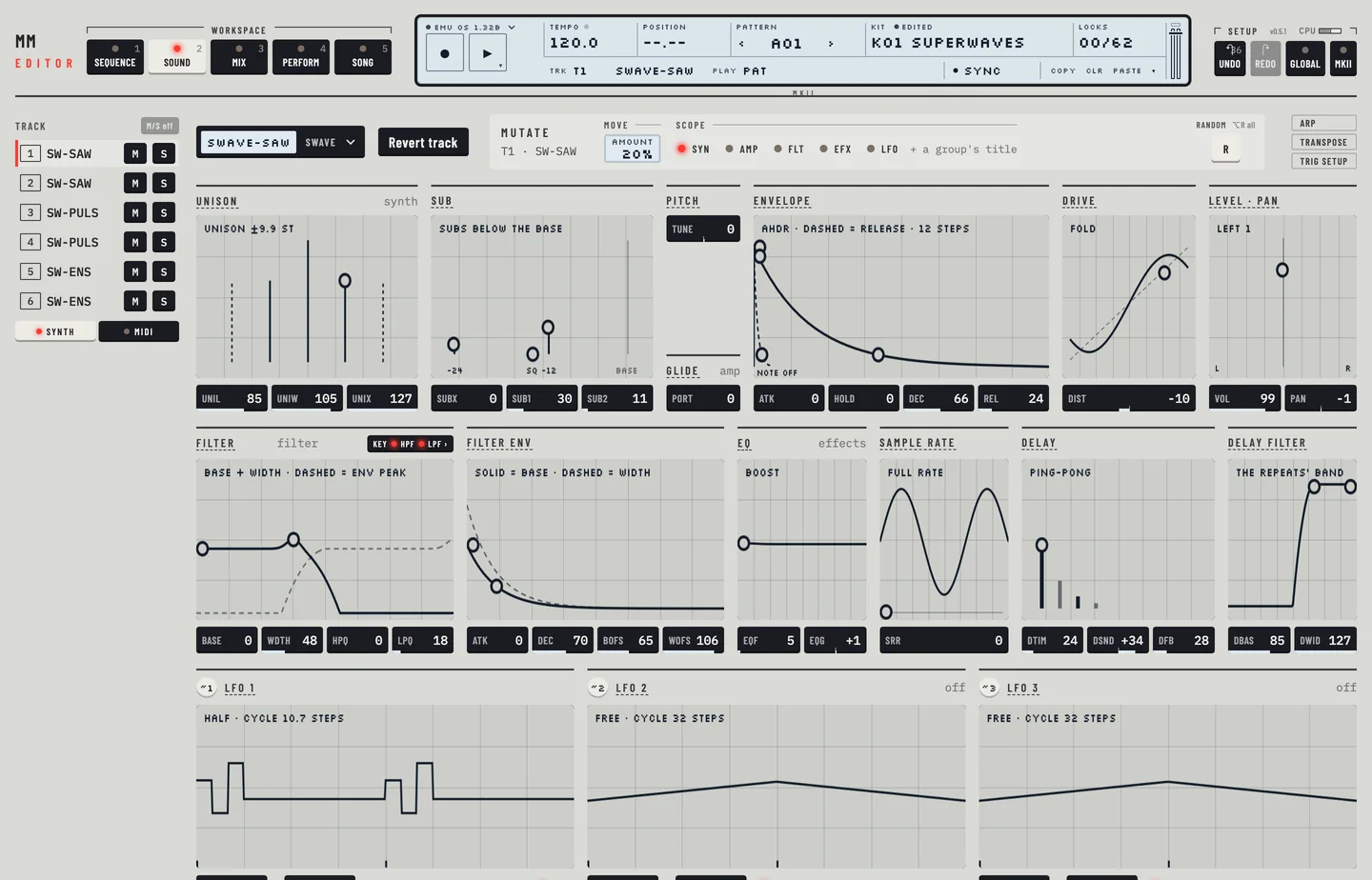
Each synth track has three LFOs. An LFO moves one parameter of the track, or of the pitch, in a repeating shape. The three LFOs of a track are independent, and an LFO can move a parameter of another LFO.
The LFOs are the bottom row of the Kit workspace. Each has its own group, titled LFO 1, LFO 2 and LFO 3. A group holds, from the top:
- a picture of the LFO across the pattern (two bars at least), with ticks where the LFO is triggered and the locks of the track on the LFO's parameters shown, see "LFO and parameter locks" below;
- the target: PAGE and DEST selects, with the TRIG keys beside them;
- eleven keys for the shape;
- four value boxes: MULT, SPD, INTL and DPTH.
The group is marked off while its depth is 0.
LFO #
MM manual p.1-35
An LFO needs a target. Its target is a page and a destination on that page.
Choose a target
- Select the track and go to the Kit workspace ([2]).
- In the LFO's group, open the PAGE select. It lists PTCH, SYN, AMP, FLT, EFX, LF1, LF2, LF3 and MIDI.
- Open the DEST select and choose the parameter. It lists the parameters of the page. For PTCH it lists eight ranges: 1/12, 2/12, 7/12, 1OCT, 2OCT, 4OCT, 8OCT and 16OCT. For LF1 to LF3 the parameters are those of the other LFOs. For MIDI they are the parameters of the MIDI page.
- Set DPTH, the depth, above 0.
Changing the page sets the destination back to the first entry.
Route by dragging
The key marked ~ and the LFO's number, at the head of the group, is a handle. Drag it onto any value box on the page. The value boxes that can be a target are marked while you drag. Drop the handle on one. The editor sets PAGE and DEST to that value, and gives the depth a start value of 32 if it was 0. A note names the LFO and the value it now moves.
TRIG #
MM manual p.1-35
The TRIG keys set how the LFO starts.
| Key | What the LFO does |
|---|---|
| FREE | runs on without being restarted |
| TRIG | starts again on each trig |
| HOLD | holds the value it has when a trig comes |
| ONE | plays one cycle after a trig |
| HALF | plays half a cycle after a trig |
Which steps trigger the LFO is set in the sequencer: see "LFO trigs" below.
WAVE #
MM manual p.1-35
Eleven keys, each with a small picture, choose the shape. They are, in order: TRI, ITRI, SAW, ISAW, SQR, ISQR, EXP, IEXP, RMP, IRMP and RND. Click a key to choose a shape. The picture of the LFO redraws.
DPTH #
MM manual p.1-36
DPTH is the depth: how far the LFO moves its target. At 0 the LFO does nothing and its group reads off. Drag the value box.
LAYERING #
MM manual p.1-37
Two LFOs can move the same target, and their movements add. A value box that an LFO moves shows a small badge, ~ and the number of the LFO, for example ~1 or ~12 when two LFOs move it. Hover over the badge to read which LFOs these are.
LFO AND PARAMETER LOCKS #
The picture of an LFO follows the locks of the selected track. A lock on TRIG, WAVE, MULT, SPD, INTL or DPTH of this LFO (set in the lock lane of the Pattern workspace, page LF1, LF2 or LF3) changes the LFO for the length of its step only: the LFO runs on at that step's speed, in that step's shape and depth, and goes back to its own values at the next step. The picture draws that. A step with such a lock is shaded, its tick is taller, and the label under the title names the locked parameters. A lock on a step that has no trig does nothing, and the picture ignores it. The picture is drawn again when you open the Kit workspace or change a value there.
LFO TRIGS #
MM manual p.1-37
The sequencer triggers the LFOs on its own. A trig with its LFO trig on triggers the LFOs of the track at that step. It matters for the TRIG, HOLD, ONE and HALF keys. In the Pattern workspace right-click the step and choose Envelopes, then LFO, to switch it. A note without its LFO trig shows the letters of the envelopes it does fire.