Appendix B: MIDI control reference
The Monomachine takes notes, controllers, NRPN values and a few system messages. This appendix lists them and says where the editor uses each one. The editor sends them to the emulated machine, or to a real Monomachine over MIDI, as you work: you do not write them by hand.
CHANNELS #
MM manual p.B-1
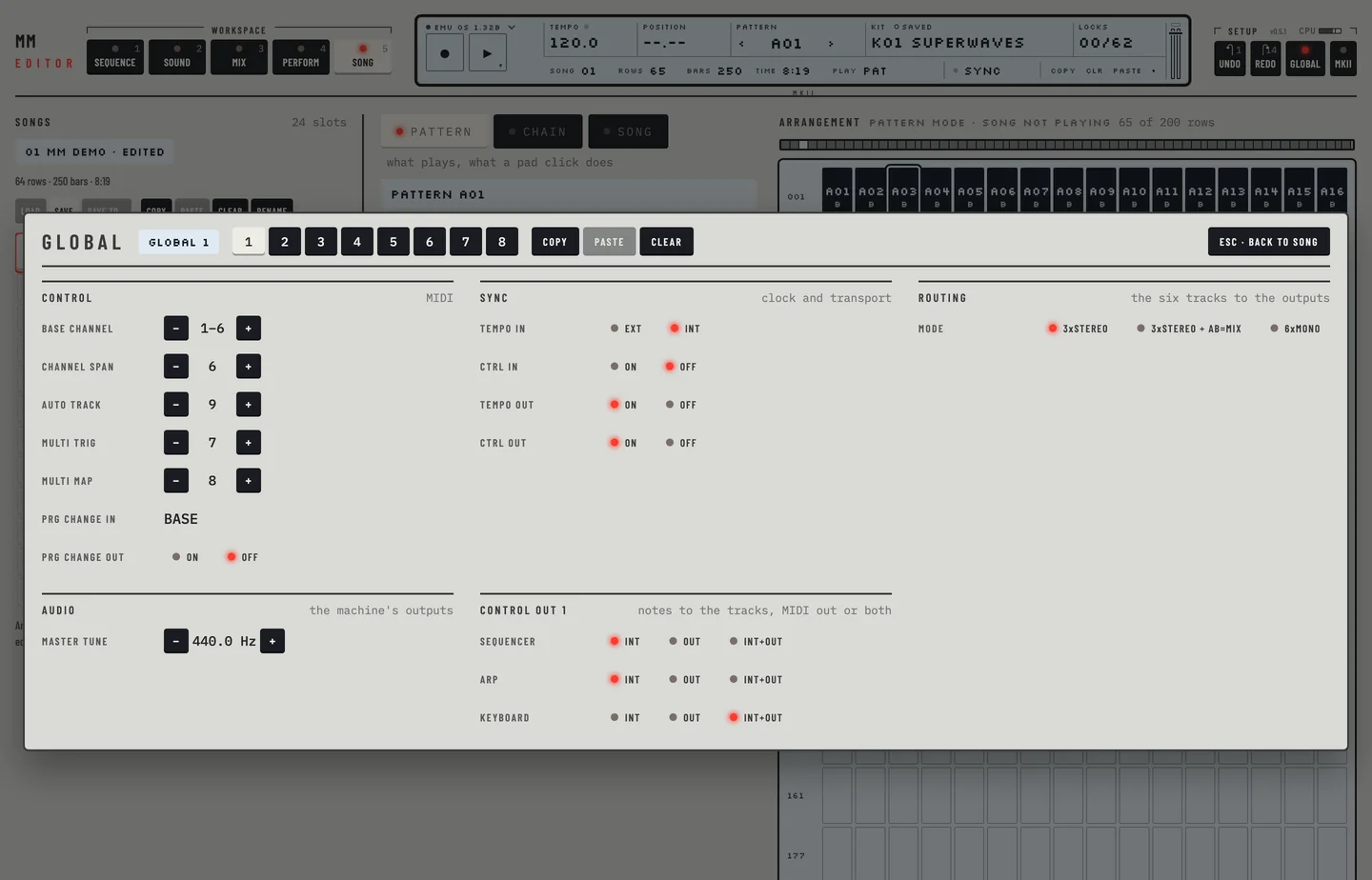
Each track listens on its own channel: the base channel plus 0 to 5. You set the base channel and the span in GLOBAL, in the Control section (chapter 19). The on-screen keyboard, the home row keys and the roll keys use these channels. Notes from a MIDI keyboard or a DAW use them too, and a note on a channel that no track listens on plays nothing.
- Click GLOBAL in the top bar. The panel opens with the MIDI channels.
- Click the minus beside Channel span until it reads 0. No track has a channel, and the panel says so.
- Close the panel and click the M of a track on the rail. The editor refuses and offers the fix in a notice.
- Open GLOBAL again and click Give each track its own channel. The span reads 6 and M mutes the track.
NOTE ON / OFF #
MM manual p.B-1
A note on starts the amp, filter and LFO envelopes of a track and a note off releases them. The on-screen keyboard, the home row keys and the keys of the piano roll send them.
MULTI TRIG CHANNEL #
MM manual p.B-2
The multi trig channel plays all tracks at once, splits the keyboard between tracks, starts the sequencer or transposes it. The Perform keyboard sends these notes.
MULTI MAP CHANNEL #
MM manual p.B-2
Notes on the multi map channel trigger patterns. The Perform keyboard sends them.
AUTO CHANNEL #
MM manual p.B-2
Notes on the auto channel go to the active track. The Perform workspace has an Auto track setting for it.
CC: JOYSTICK UP / DOWN #
MM manual p.B-2
The joystick sends controller 1 for up and controller 2 for down. The assign pad of the Perform workspace sends them.
CC: LFO 1 TO 3 #
MM manual p.B-3
Controllers 88 to 95, 104 to 111 and 112 to 119 carry the values of LFO 1, LFO 2 and LFO 3.
CC: ALL NOTES OFF #
MM manual p.B-3
The panic command, [⌘] + [.] or Panic in the transport menu, lets every held note go. It sends controller 123 on the channel of each track. Controller 120, which the manual names for this, does nothing on OS 1.32B.
- Press [SPACE]. The machine plays.
- Right-click the play key and click Panic. Every note goes off and the machine stops.
NRPN PARAMETERS #
MM manual p.B-5
An NRPN message carries a track, a parameter and a value. The values of the MIDI page go out as NRPN 0x38 to 0x3F.
NRPN PITCH #
MM manual p.B-5
The machine takes a pitch for a track by NRPN. The editor does not send it.
NRPN NOTE OFF, TRIG TRACK #
MM manual p.B-5
The machine releases a note or triggers the amp, the filter or the LFO of a track by NRPN. The editor does not send these.
NRPN MULTI ENV #
MM manual p.B-5
The multi envelope has the NRPN range 0x40 to 0x45. The multi envelope of the Perform workspace sends it.
PROGRAM CHANGE #
MM manual p.B-6
A program change on the base channel selects a pattern. The firmware reacts to it when your host sends one, for example from a clip. With Prg change out on, choosing a pattern in the editor sends one out.
SONG POINTER, CLOCK, START, CONTINUE, STOP #
MM manual p.B-6
These system messages sync the machine to a host. The firmware handles them, and the editor uses them when it follows the host's clock (Tempo in EXT). A loop in the DAW arrives as a song position and a continue. When the host stops, the editor sends All Notes Off on every channel as well. With Tempo in on INT none of these reach the machine.
The machine's own MIDI out carries notes, controllers, program changes, pitch bend, pressure, clock, start, stop and continue. It never carries SysEx.