Appendix C: SysEx reference
The Monomachine is edited and backed up with SysEx messages. This appendix lists them by their message number and says where the editor uses each one. You do not write them by hand: the editor sends them as you work, and writes or reads them in a .syx file when you use Export SysEx… and Import SysEx… (chapter 19, "FILE").
0x50 / 0x51 GLOBAL DUMP, REQUEST #
MM manual p.C-1
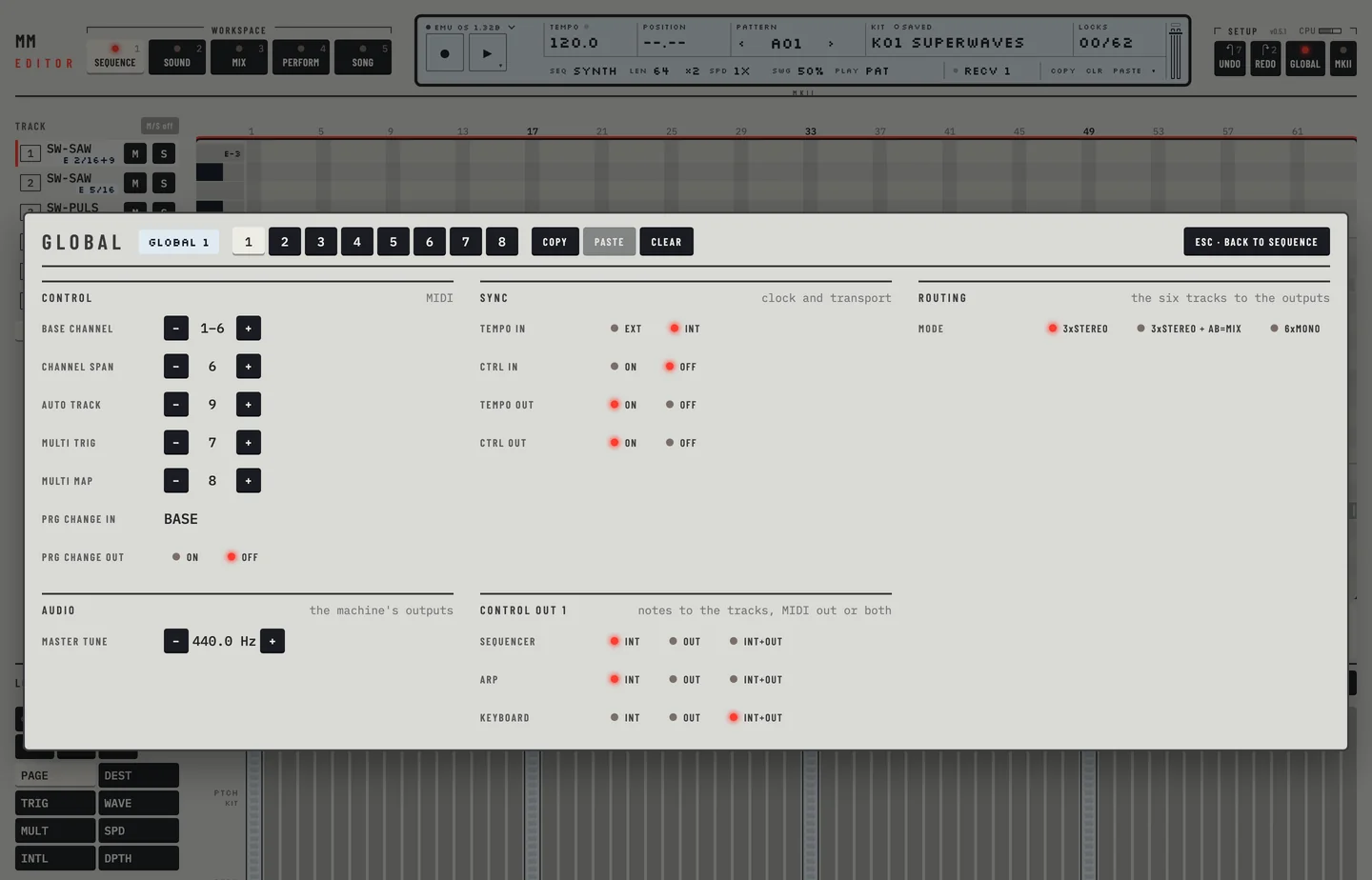
The global dump holds the data of one global slot: routing, MIDI channels, control in, control out 1 and 2, the MIDI sequencer settings, the multi map and the master tune. The editor reads and writes all of these. A few bytes have no known use, and the editor keeps them as the machine sent them.
- Click GLOBAL in the top bar.
- Click the plus beside Master tune. The tune goes up by 0.1 Hz.
- Hold [SHIFT] and click the minus. The tune goes down by 1 Hz.
- Press [⌘] + [Z] twice. The tune is as before.
0x52 / 0x53 KIT DUMP, REQUEST #
MM manual p.C-1
The kit dump holds a whole kit. The kit library and the SysEx panel send and read it.
0x55 SET CURRENT KIT NAME #
MM manual p.C-1
This message renames the kit that is loaded. The Rename control of the kit library sends it.
0x56 SET ACTIVE GLOBAL #
MM manual p.C-1
This message chooses the global slot in use. The slot keys of the GLOBAL panel send it: click key 2 and it lights, and the machine takes slot 2 as the active global. A slot made active while a dump is arriving on the SYSEX RECV screen stays active.
0x57 LOAD PATTERN #
MM manual p.C-2
This message switches the machine to another pattern. The pattern chooser sends it.
0x58 / 0x59 LOAD / SAVE KIT #
MM manual p.C-2
These messages load a kit from a slot of the machine and save the current kit to one. The kit library uses them.
0x5B ASSIGN MACHINE #
MM manual p.C-2
This message gives a track a machine, with its start mode. The machine picker sends it.
0x5C SET TRACK ROUTING #
MM manual p.C-2
This message sets the output bus and the input of a track. The Mix workspace sends it.
0x5D / 0x5E DIGIPRO WAVEFORM DUMP, REQUEST #
MM manual p.C-2
These messages carry the user waveforms of the DigiPRO. The DigiPRO card of the GLOBAL page requests each position to list them, and Export SysEx… requests them for a file. A factory waveform answers nothing. The machine takes a waveform dump only on GLOBAL > FILE > DIGIPRO MGR > RECEIVE: the editor opens that screen with the machine's keys, sends the dumps and writes them. Load, Rename, Paste and Undo on the card send them. Over HW MIDI you open the screen yourself.
0x5E SET GATE BOX PARAMETER #
MM manual p.C-2
This message sets a reverb parameter of the gate box. The editor does not use it: the reverb values go out as controllers (appendix B).
0x61 SET TEMPO #
MM manual p.C-2
This message sets the tempo, from 30 to 300 BPM. The TEMPO field of the LCD sends it.
0x67 / 0x68 PATTERN DUMP, REQUEST #
MM manual p.C-3
The pattern dump holds one pattern. Every edit of the sequence and the pattern chooser use it.
0x69 / 0x6A SONG DUMP, REQUEST #
MM manual p.C-3
The song dump holds one song. The Song workspace sends and reads it.
0x6C / 0x6D LOAD / SAVE SONG #
MM manual p.C-3
These messages load a song from a slot and save one to it. The Load and Save controls of the Songs column send them.
0x70 TO 0x72 STATUS REQUEST, SET, RESPONSE #
MM manual pp.C-3, C-4
The status messages carry the slot, the pattern or song mode, the poly setting and the tracks of the machine. The editor reads and sets them as you change the pattern or song mode, the poly setting and the kit state.
TURBOMIDI SPEED MESSAGES #
MM manual pp.C-4, C-5
TurboMIDI messages negotiate a faster speed on the cable between a host and a real machine. The editor does not send them.