Routing
Routing is on the Mix workspace. Press [3], or click the Mix tab. The six synth tracks have a strip each. Under the strips is the Routing bar, and under it a drawing of the signal path: the tracks, the three buses AB, CD and EF, the outputs and the input jacks.
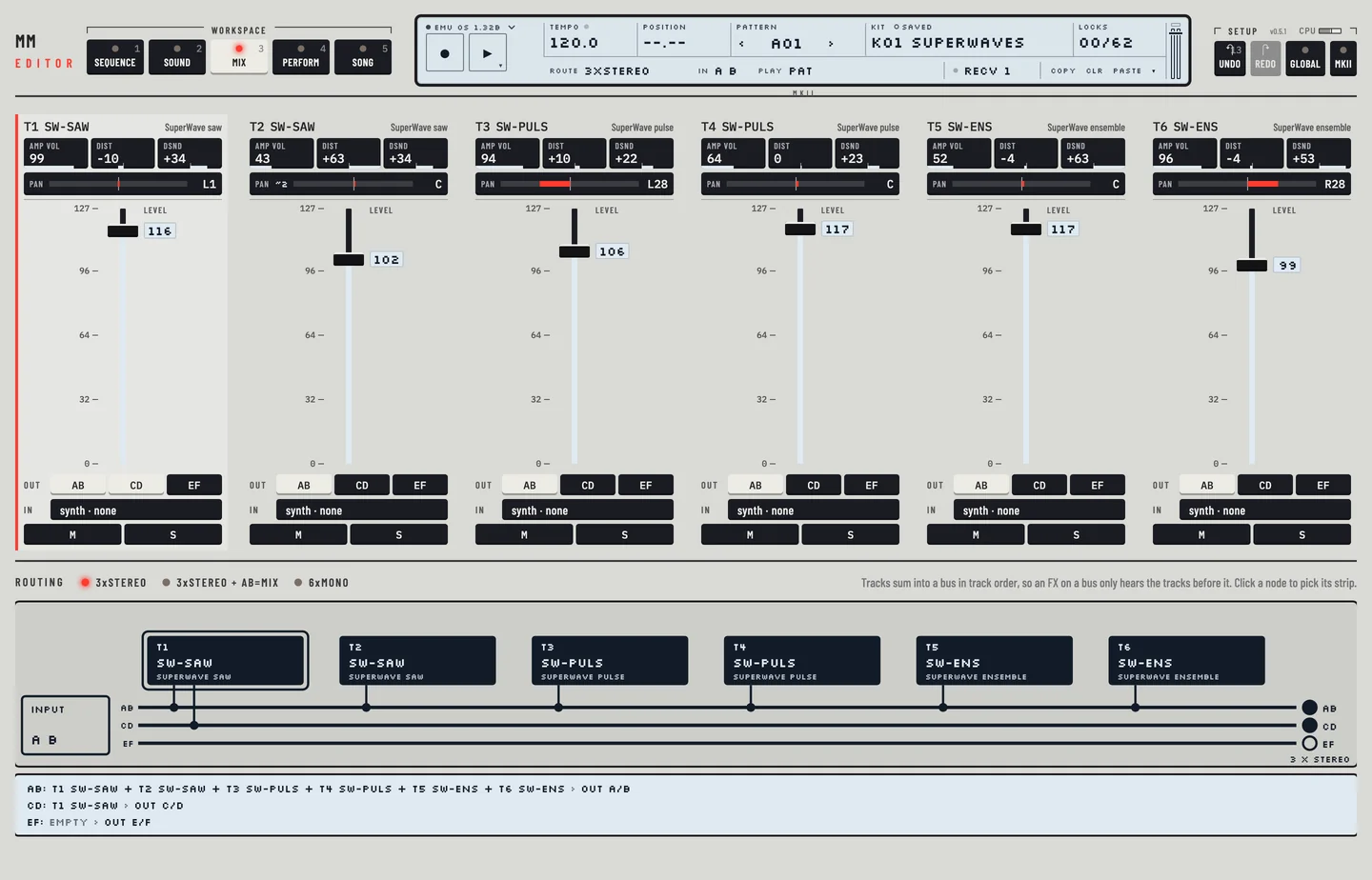
Click a track in the drawing to select its strip. The lines under the drawing say what each bus carries and where it goes, for example AB: T1 + T2 › OUT A/B.
THE MIXER #
MM manual p.1-81
Each strip holds, from the top: the sound's trim values (AMP VOL, DIST, DSND), PAN, the LEVEL fader, the buses the track sends to, the input, and the M and S keys. Double-click the LEVEL fader to set it to 100, the level a new track starts at. That is one undo step.
The Out keys AB, CD and EF on a strip choose the buses the track feeds. A lit key means the track sends to that bus. A track can feed more than one bus.
Tracks add into a bus in track order. An effect on a bus therefore hears only the tracks before it.
FX MACHINES #
MM manual p.1-81
An effect machine needs an input and a trig to work. When you choose an effect machine for a track on Kit, the editor sets its input and sets the amplitude envelope values DEC and REL to 64, as the machine starts it. The page tells you so. A trig on the track then opens the effect.
AUDIO INPUTS #
MM manual p.1-82
An effect track has an In menu on its strip. The audio inputs are INP A, INP B and INP AB. The drawing shows a dashed line from the input jack to the track.
To use an effect as a first stage in a chain, give the track the machine THRU. Choose it in the machine picker on Kit.
NEIBOR ROUTING #
MM manual p.1-83
NEIBOR is an input that takes the sound of the track before. The drawing shows an arrow from the neighbour. Effects can follow each other this way. Track 1 has no neighbour, so its menu has no NEIBOR.
MIX BUS ROUTING #
MM manual p.1-84
BUS AB, BUS CD and BUS EF are inputs that take what a bus carries. If the effect track also sends to the same bus, it replaces what was there: the line below the drawing reads "INSERT". If it sends elsewhere, it takes a copy of the bus: a send. The line names the track that "takes a copy".
OUTPUT METERS #
Under each bus line of the drawing, next to its output jack, is a meter with two thin bars, left over right. It measures the output pair after the volume: A/B, C/D and E/F. The solid bar is the level, the pale bar behind it is the peak, and the thin mark is the highest peak, held for a moment before it falls. The scale runs from -60 dB at the left to 0 dB at the right. The small square at the left end fills for a few seconds after a sample went over 0 dB.
The meters work only while the Mix workspace is open. A pair the host has not switched on is dimmed.
ROUTING MODES #
MM manual pp.1-85, 1-89
Click a mode on the Routing bar. The field ROUTE on the second line of the LCD steps through them on a click. The Routing card of the GLOBAL panel has the same keys.
- 3xSTEREO: the three buses go to the three stereo outputs, AB to A/B, CD to C/D and EF to E/F. This is the default.
- 3xSTEREO + AB=MIX: as 3xSTEREO, and CD and EF are also added to A/B.
- 6xMONO: each track goes to its own output, A to F. The buses are not sent out.